Locate the source and cwd
Find stored records by native session ID and preserve the actual cwd. Existing worktrees are not silently replaced with the repository root.
 Watch / 值更Session Handoff
AGENTRELAY / LOCAL SESSION HANDOFF
Another coding tool. The same work.
Hit a Claude Code limit, a full context window or a stuck investigation? Carry the saved history and working directory into Codex, OpenCode, Kimi, Pi or Grok and keep going.
Read saved history, check the working directory, then choose a target agent.
 Claude CodeInteractive preview
/Users/dev/projects/example-apiCheck the API retry flow and retain earlier conclusions and failed attempts.
Confirmed the working directory and retry boundary. Next: error-handling regressions.
BashEditReadThe desktop project must exist first. Tool calls and results may become text. Model continuation is outside the limited pass.
demo-plan / example-apiSynthetic source loaded. Awaiting preview.
Synthetic records only. No local reads, agent writes, client launches or model requests.
Protection is route-specific. A narrow check is not a universal safety guarantee. The desktop app has four views (session handoff, handoff history, supported routes, settings) with light, dark and system appearance.
Find stored records by native session ID and preserve the actual cwd. Existing worktrees are not silently replaced with the repository root.
The Codex route binds the target directory and configuration, with an execution journal and persistent lock. Uncertain outcomes are queried, not blindly resubmitted.
Transfer recorded messages and events into the target format. Preservation varies; an internal round-trip is not proof of native continuation.
If opening fails after import, retry opening only. A failed terminal launch falls back to copying the command without another transfer.
Validate by source, direction, platform and version. CLI discovery is not compatibility evidence.
| Handoff route | Entry point | Evidence and limitations | Status |
|---|---|---|---|
| Claude Code → Codex Desktop | Official import | macOS arm64 synthetic sample: project listing, prepare / confirm and two independent opens passed within scope. Tool records may become text; model continuation remains limited. | Limited pass |
| Claude / Codex / OpenCode / Kimi / Pi / Grok | Baseline CLI adapters | Reading, conversion and resume entry points exist, and the six desktop target cards reuse each adapter resume command verbatim; Grok additionally passed isolated native replay via `sessions list`, `export` and ACP `session/load`. Native acceptance is not proven for every combination, platform, content sample or version. | Per-route validation |
| OpenCode Web / TUI enhancement | Official JSON experiment | 1.18.29 isolated history visibility and valid target model passed. One continuation request returned provider 429; not integrated as a new default entry. | Not integrated |
| Antigravity 2.0 → Antigravity CLI | Same-product interactive picker | The official /resume Antigravity tab imports after a second confirmation; --conversation only resumes existing CLI history. Watch has no adapter or native acceptance. This is not other-agent → Antigravity import. | Not integrated |
| Claude Desktop Code / Other entry points | Official entry research | No complete Watch route acceptance; no new default targets. Grok moved out of this group into its own baseline card; see the supported routes table. | Not integrated |
Each guide opens with an answer that can stand alone, then the steps. Watch does not bypass limits and does not rank models.
When Claude Code reports a five-hour or weekly limit, /compact does not restore quota. Watch reads only the local ~/.claude/projects/<encoded-cwd>/<session>.jsonl, checks the working directory, and copies that record into Codex. The original file stays unchanged. Tool events may become text.
Read the guideOpenCode keeps sessions in ~/.local/share/opencode/opencode.db. WATCH_OPENCODE_DB points Watch at another file. Watch writes sessions, messages, and parts in one SQLite transaction and rolls back if it fails. Unsupported tool fields become text. Later replies depend on the model you configure.
Read the guideA full context window means this conversation is too long: run /compact or /clear inside Claude Code. An account limit names a reset time, and /compact does nothing then. Watch neither enlarges the window nor restores quota. It copies the saved session into another agent that can still run.
Read the guideOpus 5.5 raises the five-hour limit on Pro, Max, Team, and seat-based Enterprise, and adds one reset you can save. It does not remove the limit. Watch does not read or raise Claude quota. Hand the saved session to Codex only after that official reset is still not enough.
Read the guideRun the CLI from the repository or build the desktop app. Repository access is required. No global npm package is published.
git clone https://github.com/can4hou6joeng4/Watch.gitcd Watch && npm installnpm run watch -- status --jsonnpm run watch -- import-codex prepare <claude-id> --cwd /abs/project --desktop-project --experimental --jsonnpm --prefix desktop installnpm run desktop:devcd desktop && npx tauri buildMissing tsx? Run npm install first. A node:sqlite error requires checking the Node version.
Generated from synthetic sessions in an isolated environment: the animation replays real CLI output with its original timing; the screenshot is the desktop browser preview in synthetic demo mode. They show real behaviour, not native acceptance evidence.

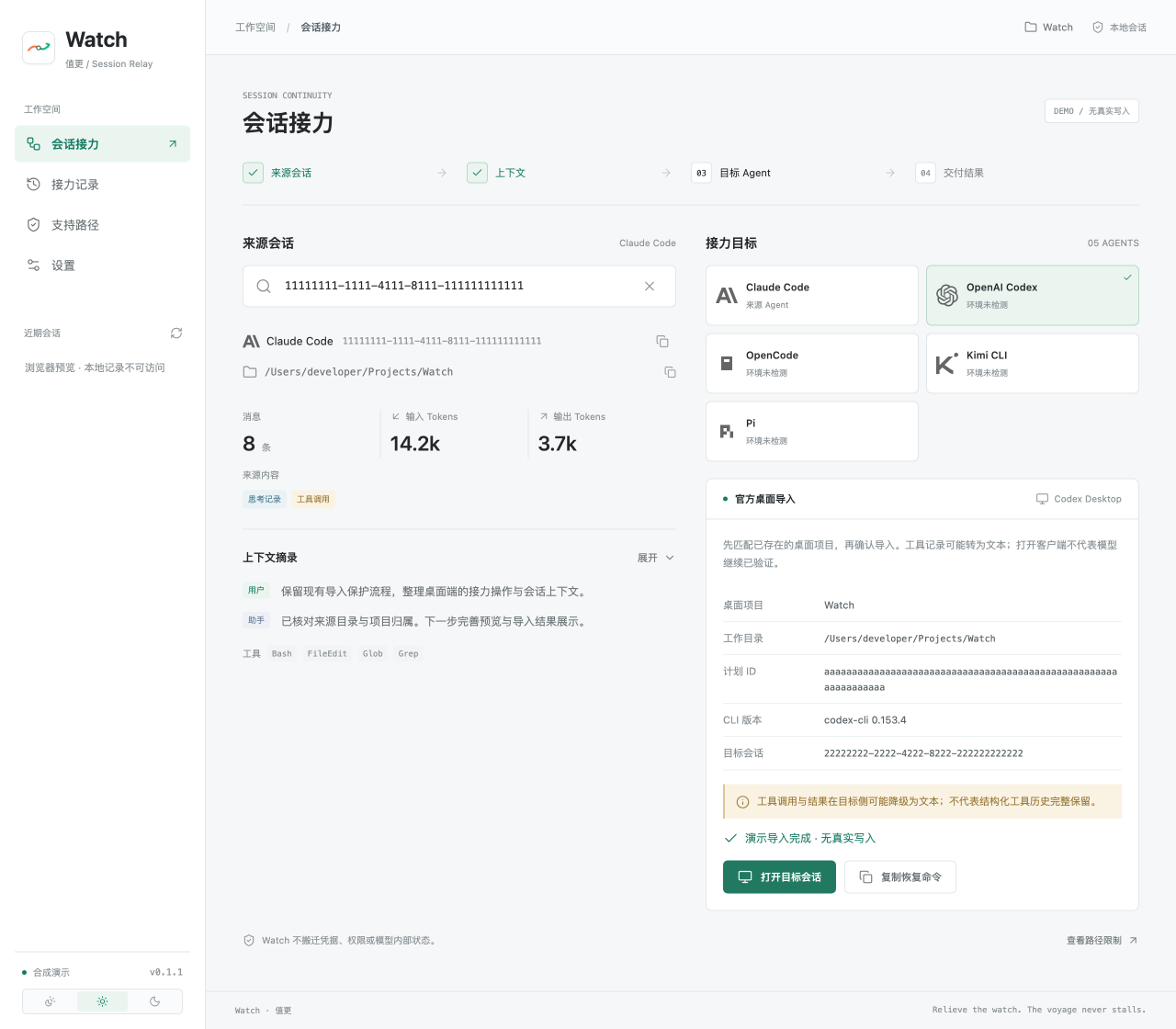
Historical repository validation, not new native-client acceptance from this redesign.
Codex CLI 0.153.4 / macOS arm64. Tool records became text; no desktop UI or model continuation.
ChatGPT Desktop 26.901.51231. Synthetic sample visible in the project list; no model continuation.
ChatGPT Desktop 26.903.61454. Two opens reached the same synthetic target with one import plan. Model continuation remains outside the pass.
Enter the source session ID in Watch, check the detected working directory and pick a target agent. Claude → Codex shows the official project-first import preview and writes only after you confirm, then opens the target separately; other targets use the existing CLI adapters. Watch does not bypass usage limits and does not move code; it transfers the saved session record.
Two entry points: in the desktop app select the source session and click the OpenAI Codex card (official single-session import: prepare → confirm → open), or run watch import-codex prepare <claude-id> --cwd <project> --desktop-project --experimental followed by confirm. The project must already exist in Codex Desktop. Tool records may become text on the Codex side and model continuation is outside the validated scope.
No. Compacting or clearing context is Claude Code's own /compact and /clear. Watch moves the saved session record as a whole into another agent; the target session starts from that record and the original session is untouched. Whether it fits depends on the target tool's context window.
Claude Code: ~/.claude/projects/<encoded-cwd>/<session-id>.jsonl, resume with claude --resume <id>. Codex: ~/.codex/sessions/YYYY/MM/DD/rollout-*.jsonl, resume with codex resume <id>. OpenCode: ~/.local/share/opencode/opencode.db, resume with opencode -s <id>. Watch looks these up by session ID, shows the owning working directory, and lists chained handoffs for that directory under Handoff History.
Watch does not rank the two. With both installed and authenticated, hand sessions across: Claude → Codex uses the official import preview, Codex → Claude uses the CLI adapter conversion; both keep the working directory. Some events may be degraded between formats, and the result lists what was degraded.
Watch has no relay server of its own. Some native session creation routes invoke the target CLI and may access its network services. Model continuation also follows that service’s privacy and model rules. Local conversion does not mean an entirely offline workflow.
No. New files and whole-file replacements have atomic writes and parse-back checks, while some append paths have different protections. Official Codex imports use their own journal, target lock and read-back verification. See the architecture for exact boundaries.
Official entry points reviewed; not integrated into Watch. These are Antigravity operations, not Watch conversion commands.
Officially documented / Not Watch-validated
agy --conversation <conversation-id>Resumes an existing Antigravity CLI conversation ID. It is not an importer for Claude, Codex or desktop conversations.
agy -cLooks up the latest conversation for the current working directory. Missing or deleted history can start a new conversation, so this is not a side-effect-free status check.
/resumeSwitch to the Antigravity tab in the CLI session picker, select a desktop conversation and confirm the import. Official documentation describes cloned history, context and tool trajectories. Watch has not natively validated it and has no external-agent import contract.